- Log in to your web client dashboard.
- Go to Settings > Call forwarding, and choose how to manage incoming calls when the extension’s status changes.
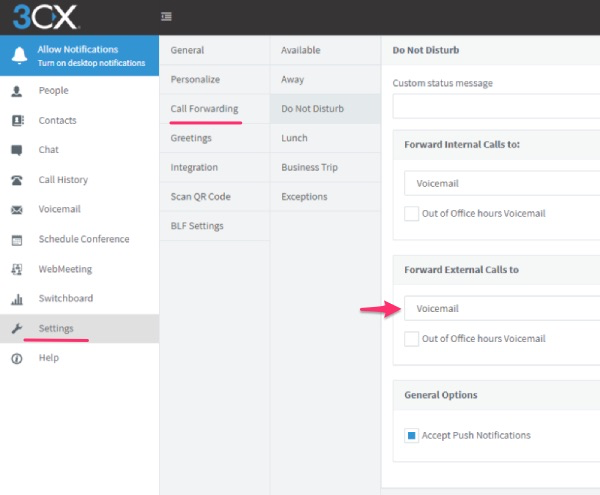
Enter your Smith number into the status you want calls to forward from. You can set this for internal and external calls to your line. That's it! Your calls should now be routed to your Smith receptionists.
Questions? Contact us!
If you're already a Smith.ai client and need help, please email us at support@smith.ai or call us at (650) 727-6484 for assistance.
If you're not yet a Smith.ai client, please schedule a free consultation to get started with our virtual receptionist services or email us at sales@smith.ai. We'll help you select the best plan to match your business’s growth goals and budget.
Was this article helpful?
That’s Great!
Thank you for your feedback
Sorry! We couldn't be helpful
Thank you for your feedback
Feedback sent
We appreciate your effort and will try to fix the article