Intermedia customers will need to set up call forwarding to Smith.ai for our receptionists to answer your calls. Follow the directions below to change the settings in your Intermedia account to ensure your calls are being forwarded correctly:
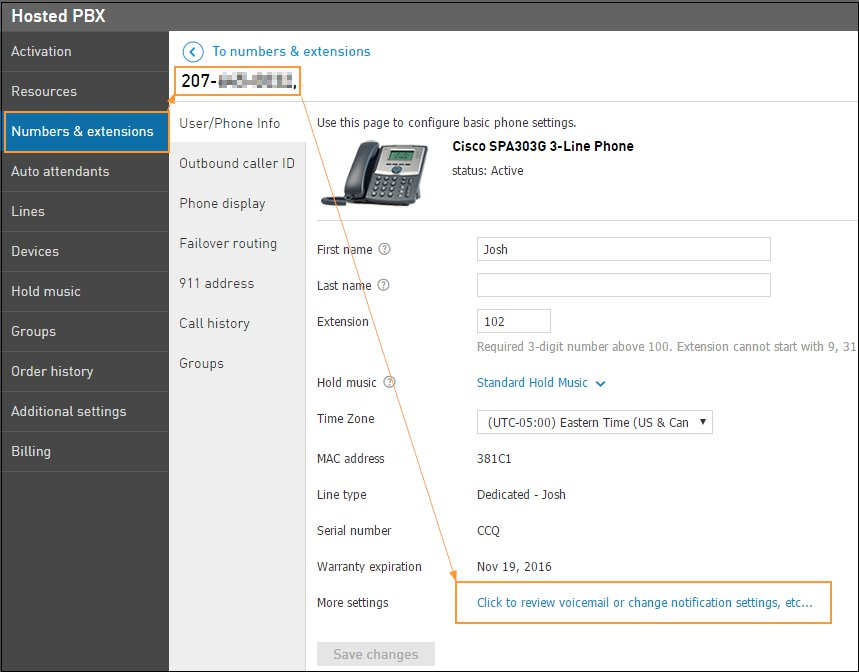
- In your Intermedia Admin Portal navigate to Services > Voice Services > Numbers & Extensions. Select the number you want to forward, and click change notification settings.
- Go to FollowMe Forwarding and select Forward Calls to. Input your Smith number to forward your calls to.
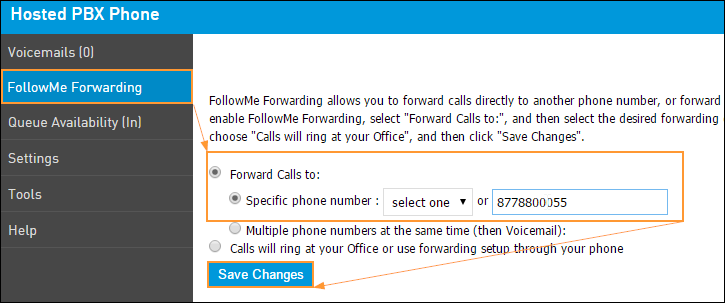
- Click Save Changes.
Questions? Contact us!
If you're already a Smith.ai client and need help, please email us at support@smith.ai or call us at (650) 727-6484 for assistance.
If you're not yet a Smith.ai client, please schedule a free consultation to get started with our virtual receptionist services or email us at sales@smith.ai. We'll help you select the best plan to match your business’s growth goals and budget.
Was this article helpful?
That’s Great!
Thank you for your feedback
Sorry! We couldn't be helpful
Thank you for your feedback
Feedback sent
We appreciate your effort and will try to fix the article