The following steps outline how to set up direct call forwarding for your Microsoft Teams calls.
- To start forwarding your calls, select Settings and more next to your profile picture at the top of Teams. Then select Settings > Calls.
- Under Call answering rules choose Forward my calls, and then select New Number or Contact, then
enter your Smith number.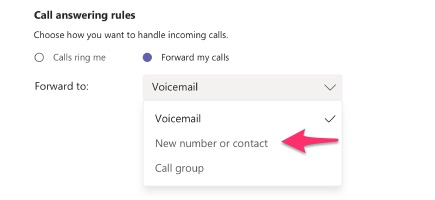
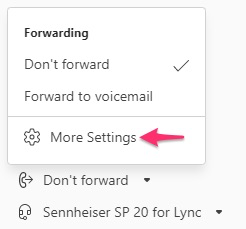
You can also find these settings (whenever you're in the Calls area) by selecting Don't forward (or Forward to voicemail, etc.) in the lower-left of Teams.
Questions? Contact us!
If you're already a Smith.ai client and need help, please email us at support@smith.ai or call us at (650) 727-6484 for assistance.
If you're not yet a Smith.ai client, please schedule a free consultation to get started with our virtual receptionist services or email us at sales@smith.ai. We'll help you select the best plan to match your business’s growth goals and budget.
Was this article helpful?
That’s Great!
Thank you for your feedback
Sorry! We couldn't be helpful
Thank you for your feedback
Feedback sent
We appreciate your effort and will try to fix the article