Smith.ai automatically blocks 20 million+ known spam callers before they ever reach your AI Receptionist. That said, sometimes unwanted callers slip through before our system can identify them as spam. Read on to learn how you can reduce the impact of spam callers on your AI Receptionist account.
Will I be billed for spam calls answered by my AI Receptionist?
How to mark a call as spam & block the caller
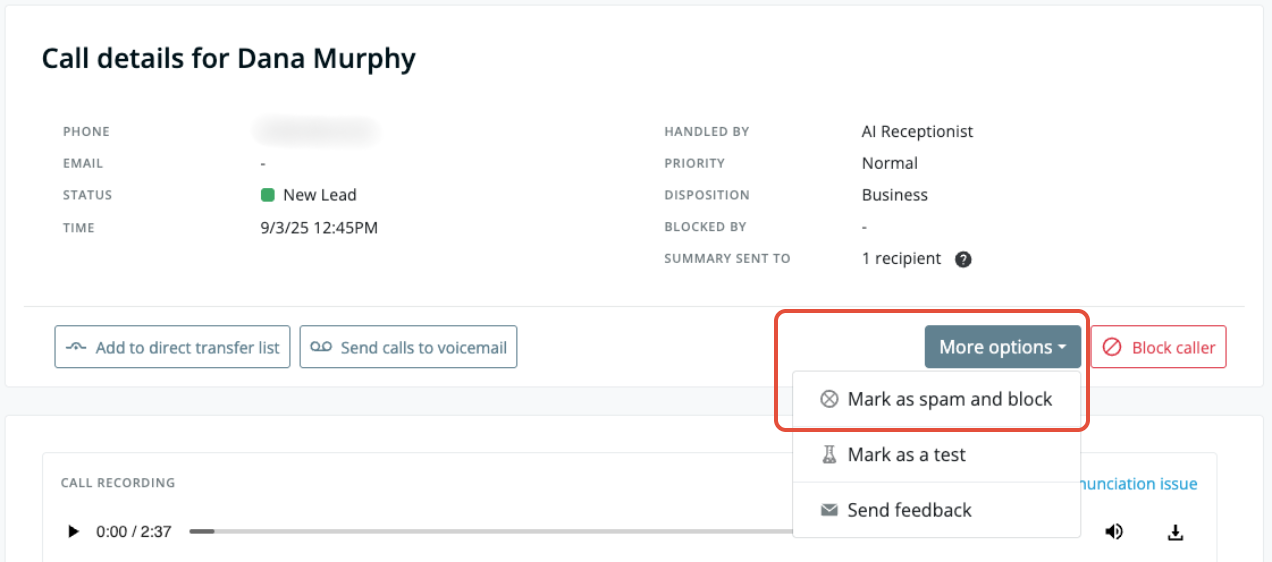
- Open the call details page for the call you want to mark as spam. There are two easy ways to do this:
- Find the call in your Call Log (within your dashboard Call History)
- Click the Call recording & transcript link from within the call summary email
- Find the More options button and click it to open the options menu
- Click Mark as spam and block and confirm
- If you are within your 10% allowance, this call is removed from your bill
- If you’ve exceeded the allowance, this initial call remains billable, but future calls from this number are blocked — and thus, not billed
How the 10% allowance works
Example 1 — Spam calls exceed allowance:
- All 10 callers are blocked automatically, so any future calls from those numbers will not be billed (starting from when you block the caller.)
- Your allowance is 5 (10% of 50 = 5), so the first 5 calls are removed from your bill.
- The other 5 calls, and any future calls answered by your AI Receptionist, are billed and non-refundable.
Example 2 — Spam and test calls combined:
- All 30 callers are blocked automatically, so any future calls from those numbers will not be billed (starting from when you block the caller.)
- Your allowance is 50 (10% of 500 = 50), so you can remove up to 50 calls from your bill each billing cycle, including spam and test calls combined.
- All 50 calls (40 spam and 10 test) are removed from your bill.
- Any additional test calls and/or spam calls during that billing cycle will be billed.
FAQs
You can block as many callers as you'd like. However, only up to 10% of your plan's monthly call quota can be marked as spam and automatically removed from your bill.
Once you reach that limit, you can still block callers using the Block caller button, but additional calls won't be credited. Future calls from the same number will not count toward your quota.
Questions? Contact us!
- If you're already a Smith.ai client and need help, please email us at support@smith.ai or call us at (650) 727-6484 for assistance.
- If you're not yet a Smith.ai client, click here to get started with our AI Receptionist services or email us at sales@smith.ai. We'll help you select the best plan to match your business’s growth goals and budget.
Was this article helpful?
That’s Great!
Thank you for your feedback
Sorry! We couldn't be helpful
Thank you for your feedback
Feedback sent
We appreciate your effort and will try to fix the article