Your AI Quality Index (AQI) is the top-line quality score in Quality Studio. It answers: How well is my AI Receptionist performing right now?
AQI is a composite of two sub-scores, Goal Attainment and Caller Experience, averaged together and trended over time so you can see whether your AI Receptionist is getting better or worse as you make changes.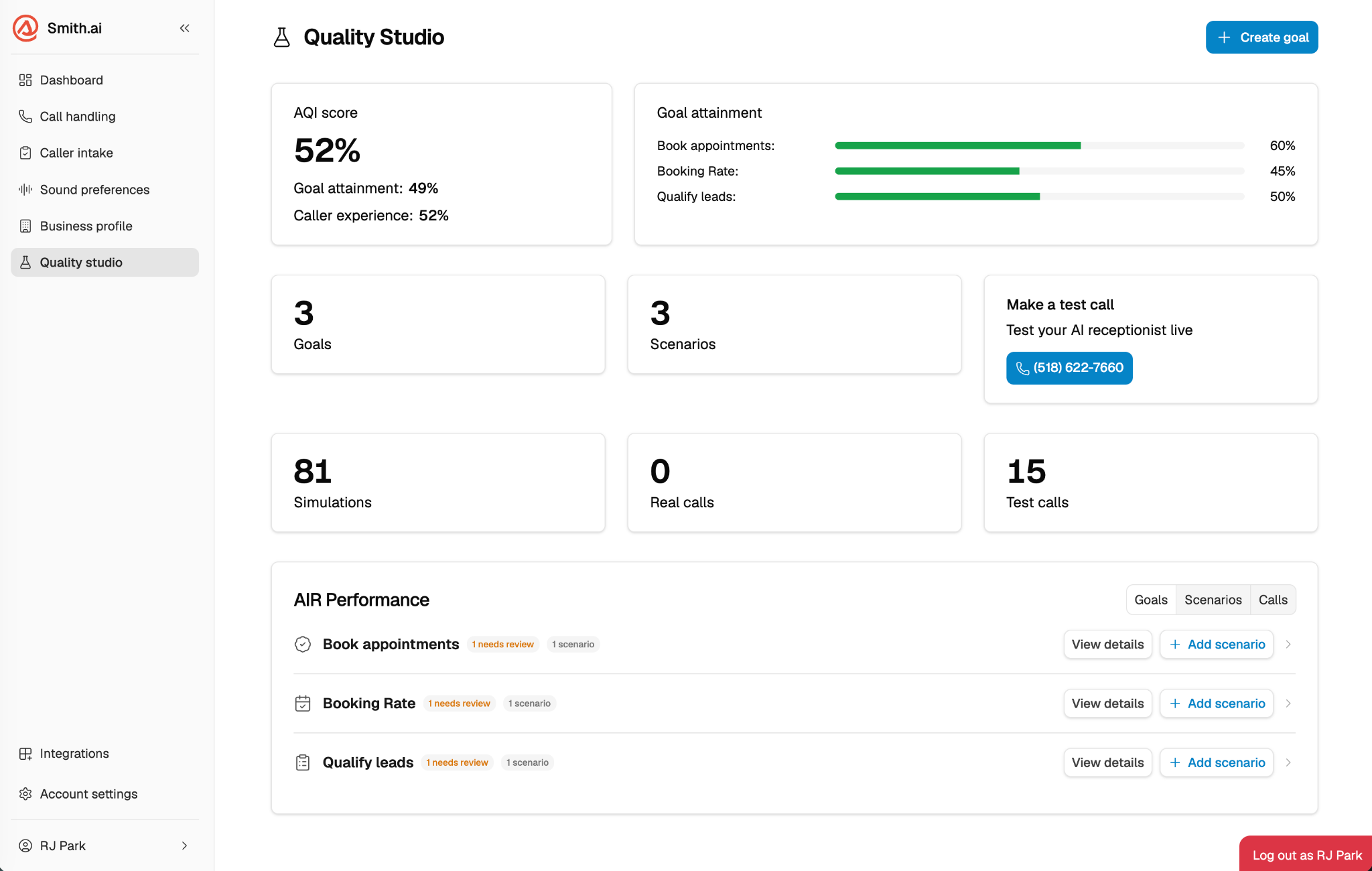
What's covered in this article?
- How AQI is calculated
- Goal Attainment: what it measures
- Caller Experience: the 5 fixed checks
- How to read your AQI on the dashboard
- How your AQI improves over time
- Frequently asked questions
How AQI is calculated
AQI = average of Goal Attainment % + Caller Experience %
Both sub-scores are weighted equally. The result is displayed as a numeric score on your Quality Studio dashboard, not a percentage.
Goal Attainment: what it measures
Goal Attainment measures whether your AI Receptionist accomplished what you defined in your goals and scenarios.
Unlike Caller Experience, Goal Attainment checks are generated dynamically. After each call, the evaluator reads your goal, your scenario description, and the call transcript — then generates a specific list of pass/fail criteria relevant to that scenario. This means the evaluation adapts automatically to your business without extra setup.
How Goal Attainment is scored:
The evaluator generates checks specific to the scenario
Each check is scored pass or fail
Scenario % = checks passed ÷ total checks generated
Goal % = average of all scenario percentages under that goal
Goal Attainment sub-score = average of all goal percentages across your active goals
Caller Experience: the 5 fixed checks
Caller Experience measures whether the interaction was natural, professional, and helpful — independent of whether specific goals were achieved.
Five checks run on every evaluated call, regardless of your goals or scenarios:
Caller Experience % for a call = Call Experience checks passed ÷ 5
Caller Experience sub-score = average CX % across evaluated calls in your scoring window (default: last 7 days)
How to read your AQI on the dashboard
Your AQI appears at the top of the Quality Studio dashboard with two pieces of information:
Numeric score: your current AQI based on the last 7 days of evaluated calls
Trend indicator: how your score has changed compared to the prior 7-day window (e.g., +4 or −2)
How your AQI improves over time
The primary way to improve your AQI is the Quality Studio loop:
Low scores flag failing goals or calls
Quality Studio proposes a specific, actionable recommendation
You accept or modify the recommendation
Your AI Receptionist instructions update
The next scoring window reflects the change, AQI trends up
Smith.ai also samples AI-scored calls internally to keep the evaluation calibrated. When human reviewers disagree with AI scores, the evaluator is updated — so your scores stay accurate as the system evolves.
Frequently asked questions
Is AQI available on the Free plan?
Yes. Your full AQI score and trend are available on all plans, including Free.
What does the AQI percentage represent?
AQI is a composite percentage score — the average of your Goal Attainment and Caller Experience sub-scores, both of which are also percentages. The trend indicator (e.g., +6 vs. prior 7 days) shows how your score has shifted between your last two 7-day windows, so you can see at a glance whether your AI Receptionist is improving over time.
What does Shared with Smith.ai to improve AIR mean on a failed check?
Some checks, especially Caller Experience checks, can fail due to factors outside your control, like a caller hanging up mid-call. Instead of hiding these results, Quality Studio shows them with a note that Smith.ai is aware and working on it. These failures don't mean your setup is wrong.
Why might my Goal Attainment check look similar to a Caller Experience check?
The evaluator that generates goal checks is dynamic and may occasionally produce a check similar to one of the 5 fixed CX checks. A small amount of overlap is expected and acceptable, it won't significantly distort your overall score.
Questions? Contact us!
- Already a client? Email support@smith.ai or call (650) 727-6484.
- Not yet a client? Schedule a free consultation at smith.ai/booking-va or email sales@smith.ai.
Was this article helpful?
That’s Great!
Thank you for your feedback
Sorry! We couldn't be helpful
Thank you for your feedback
Feedback sent
We appreciate your effort and will try to fix the article