If you have a physical location that clients or prospective clients may visit, AI Receptionist can help callers find you more easily with clear directions. It's easy to add driving directions, tips for finding your building, and even parking information to your call instructions — enhancing the caller experience, reducing potential confusion, and streamlining customers visits.
Some examples of directions:
- From downtown, head east on Main Street, turn right onto Oak Avenue and then left onto Pine Boulevard. You will find us on the right before the McDonalds. Parking is available in the garage next door.
- From I-45, take Exit 12, merge onto Maple Drive, turn left on Pine Boulevard, and find us on the left before the traffic light.
How to set up directions for AI Receptionist
- Login to your AI Receptionist dashboard and navigate to the Instructions page
- Scroll to the Directions section at the bottom of the page and click Edit
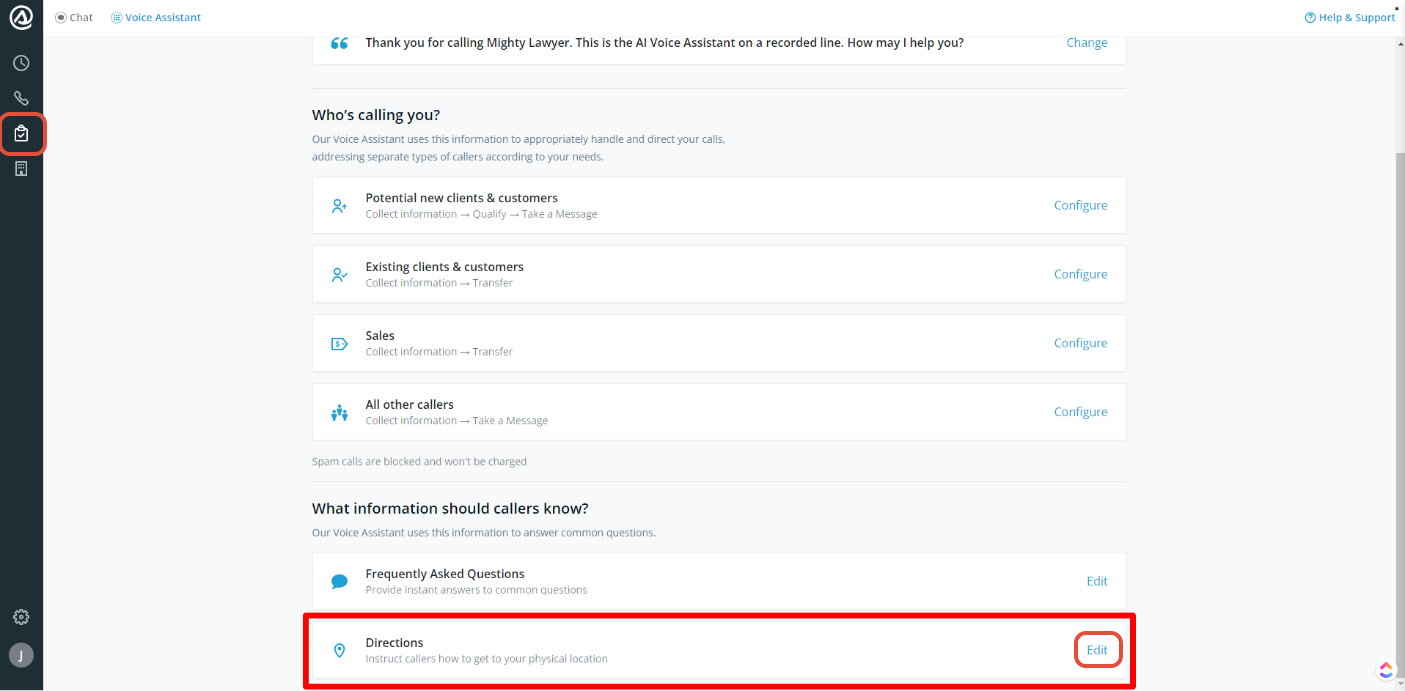
- Enter the directions in the text box
- Once you're satisfied with the changes, click Save. You will see a green confirmation message, and changes take effect immediately.
Directions are limited to 200 characters. Be sure to write concisely!
Questions? Contact us!
- If you're already a Smith.ai client and need help, please email us at support@smith.ai or call us at (650) 727-6484 for assistance.
- If you're not yet a Smith.ai client, please schedule a free consultation to get started with our AI Receptionist or email us at sales@smith.ai. We'll help you select the best plan to match your business’s growth goals and budget.
Was this article helpful?
That’s Great!
Thank you for your feedback
Sorry! We couldn't be helpful
Thank you for your feedback
Feedback sent
We appreciate your effort and will try to fix the article