AI Receptionist from Smith.ai can answer all your calls, 24/7. When you prefer that select callers to go directly to voicemail, it's easy to set up a voicemail greeting within your dashboard.
Recording your greeting
Requirements
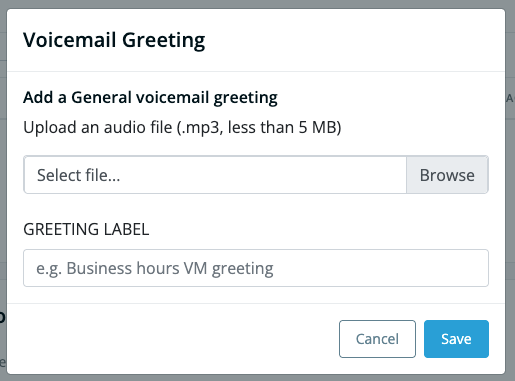
You'll need an .mp3 file that's less than 5 MB in size — about 30 seconds long or less — to upload to AI Receptionist.
Important note: If your file is not an mp3, do not change the file extension to "mp3". This doesn't make it an mp3; it makes it a fake mp3 and will cause serious problems. Learn how to change another file type to an mp3.
Preparing your greeting
A good voicemail greeting is friendly, professional, and makes it clear to the caller that they've reached your business. Not sure what to say? Start with this tried-and-true template:
“Hello. You've reached [your business name]. Please leave a message and we'll get back to you as soon as we can. Thank you, and have a great day.”
Check out our 5 Tips for Perfect Voicemail Greetings for more guidance!
How to record
If you are going to record on your own, you have several options:
- Online: We recommend Online Voice Recorder, which allows you to record your greetings, trim the start and end points, and then download them as MP3s.
- iOS/iPhone: Voice Memos app
- Mac: Quicktime’s “Record Audio” function
- PC: Windows’ Voice Recorder software
Alternatively, you could save yourself some time and hire an affordable professional. Smith.ai recommends Fiverr’s Voiceover talent. Starting at just $5, you can purchase a customized voicemail greeting, ready in just a few days. Many of our current small businesses and entrepreneurs have messages provided by Fiverr’s talent — we think they provide top-notch service.
Updating your AI Receptionist voicemail greeting
When your greeting .mp3 file is ready, follow the steps below to upload your voicemail greeting:
- Login to your AI Receptionist dashboard and open the Call Handling tab from the lefthand navigation menu

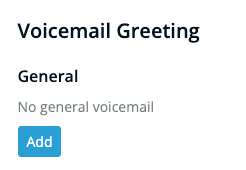
- Scroll down to the Voicemail Greeting section and click “Add” to upload your personalized voicemail greeting recording
- In the modal popup, select the correct file (.mp3 format, less than 5MB), add a greeting label, and click Save. Changes take effect immediately.
Questions? Contact us!
- If you're already a Smith.ai client and need help, please email us at support@smith.ai or call us at (650) 727-6484 for assistance.
- If you're not yet a Smith.ai client, please schedule a free consultation to get started with our AI Receptionist or email us at sales@smith.ai. We'll help you select the best plan to match your business’s growth goals and budget.
Was this article helpful?
That’s Great!
Thank you for your feedback
Sorry! We couldn't be helpful
Thank you for your feedback
Feedback sent
We appreciate your effort and will try to fix the article