AI Receptionist can send follow-up SMS messages (aka text messages) to your callers immediately after a call ends. For example:
- Thank-you notes to keep the caller engaged
- Intake form links for qualified leads
- Additional info about your company
- A link to an e-signature document (e.g. a standard retainer agreement)
Each caller type playbook has its own follow-up settings, allowing you to tailor messages to different callers' needs. You can send virtually any text as a follow-up, as long as the content fits into a standard text message.
Set up automated follow-up SMS
- Login to your AI Receptionist dashboard and navigate to the Call Handling page
- Scroll down to Follow-up Communication and select Add New
- What do you want the follow-up message(s) to say?
- What is the content of your text message? (400 character limit)
- Your content cannot include dynamic fields to personalize the recipient's information.
- Add a title for your message (Note: This is only visible to you)
- Navigate to your Instructions page
- Choose the caller type you would like to edit
- Click Add a Message in the "Send a text to the caller?" section
- Select the appropriate follow-up message from the drop-down menu.
- Click Save
Note: Text Messages will be sent from your Smith.ai phone number. Any replies will be forwarded to the phone number you provided during account creation.
That’s it! AI Receptionist will immediately start sending SMS follow-up messages to this caller type. up with your callers as requested as soon as setup is complete.
Want to test it out? Just call your Smith.ai number and follow the instructions. Remember, we never charge for test calls, but you will need to be sure to mark the call as a test in your dashboard.
FAQs
- How much does it cost?
- There is no additional fee to send SMS follow-up messages from your AI Receptionist account.
- How many follow-up messages can I configure for my account?
- You can create up to 13 unique follow-up messages on your account, however, only one message can be assigned per caller type.
- Can I include links?
- Yes, you can include links in your follow-up SMS messages.
- What happens if a caller replies to an SMS follow-up message we send?
- Text messages will be forwarded to the phone number we have set up as your redirect number.
- Can I see which follow-up messages were sent?
- You can view the follow-up message sent in the call details section on the dashboard.
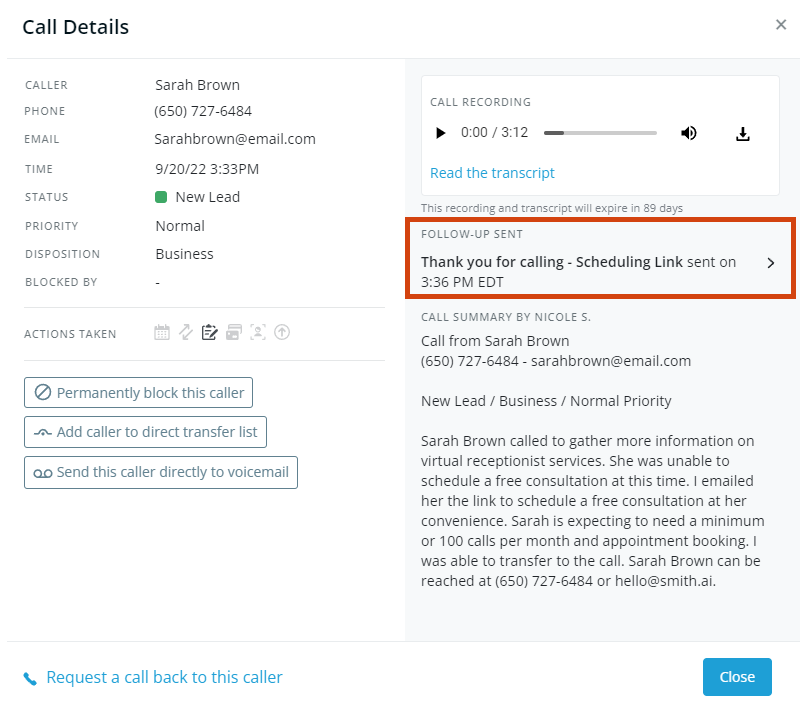
- You can view the follow-up message sent in the call details section on the dashboard.
Questions? Contact us!
- If you're already a Smith.ai client and need help, please email us at support@smith.ai or call us at (650) 727-6484 for assistance.
- If you're not yet a Smith.ai client, please schedule a free consultation to get started with our AI Receptionist or email us at sales@smith.ai. We'll help you select the best plan to match your business’s growth goals and budget.
Was this article helpful?
That’s Great!
Thank you for your feedback
Sorry! We couldn't be helpful
Thank you for your feedback
Feedback sent
We appreciate your effort and will try to fix the article